Step-by-Step Meta Kuwait Portal Guide for Residents: Registration, Login, Appointments & Biometrics
If you are a resident or citizen of Kuwait, handling government services has become much easier thanks to the Meta Kuwait Portal. The official Meta Kuwait e-government platform allows users to book appointments online, manage services, and complete biometric enrollment without the hassle of long queues at government offices. In this detailed guide, we will walk you through everything you need to know about Meta Kuwait registration, login, online appointments, biometric services, and using the Sahel App.
Meta Kuwait (meta.e.gov.kw) is a centralized government portal designed to simplify access to various services provided by Kuwait’s ministries. This platform allows citizens and residents to:
Book appointments online with multiple government agencies
Select specific dates and times for visits
Avoid long waiting periods at ministries and government offices
Access services like Civil ID renewal, biometric enrollment, Ministry of Health services, Ministry of Interior services, and more
Using the Meta Kuwait portal is mandatory for certain services, especially for biometric registration and official documentation.
Benefits of Using Meta Kuwait Portal
Convenient Appointment Booking – Book government appointments from anywhere.
24/7 Accessibility – Access services anytime using a computer or mobile device.
Reduced Waiting Time – Arrive at the ministry exactly when your appointment is scheduled.
Secure Access – Login using your Civil ID ensures high-level security.
Free of Charge – No hidden fees for booking appointments.
Step 1: Meta Kuwait Registration
Before you can use the portal, you need to create a Meta Kuwait account. Follow these steps carefully:
Visit the official Meta Kuwait website: meta.e.gov.kw
Click “Register as a New User”.
Enter your personal information:
Civil ID number
Civil ID serial number
Mobile number
Email address
Accept the terms and conditions.
Check your email for an activation link from Meta Kuwait.
Set a secure password to complete the registration.
Once your account is active, you can log in anytime to manage appointments and access services.
Step 2: Meta Kuwait Login
Logging into your account is straightforward:
Go to the Meta Kuwait login page.
Enter your Civil ID number and password.
Click Login to access your dashboard.
If you forget your password:
Click “Forgot Password” on the login page.
Enter your registered Civil ID number.
Check your email for a password reset link.
Set a new password and log in again.
Step 3: Booking Meta Kuwait Online Appointments
One of the most important features of the portal is the ability to book online appointments. Here’s the step-by-step process:
Log in to your Meta Kuwait account.
Navigate to “Appointments Search” from the left-hand menu.
Select the government agency you need.
Choose the department under that agency.
Pick the specific service you need, such as Civil ID renewal or biometric enrollment.
Select a date and time that suits you.
Confirm your booking and check your email or SMS for confirmation.
Pro Tip: Book appointments early in the morning or mid-week to avoid long queues.
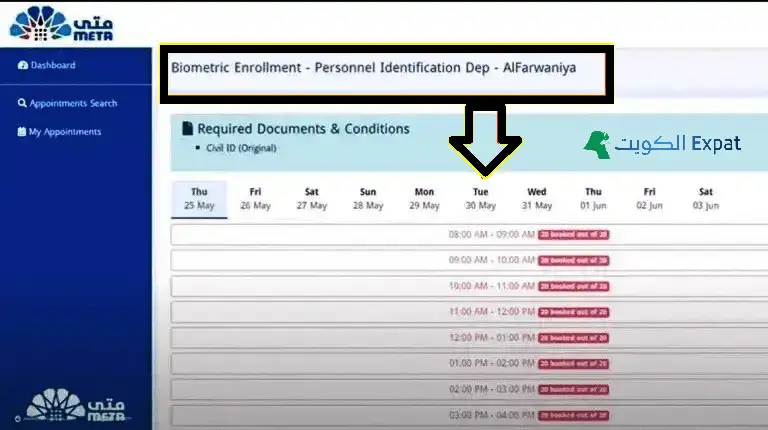
Step 4: Booking Biometric Appointments
Biometric enrollment is mandatory for all residents, Kuwaiti citizens, and GCC nationals living in Kuwait. This includes registration of face, fingerprints, and iris scan.
Log in to your Meta Kuwait account.
Go to Appointments Search.
Select Ministry of Interior.
Choose General Department of Personnel Identification.
Select Biometric Enrollment Service.
Pick a suitable date and time.
Confirm your appointment.
On the day of your appointment, simply visit the selected branch to complete your biometric scan.
Step 5: Booking via Sahel App
For residents who prefer mobile access, the Sahel App is an official solution for booking appointments:
Download the Sahel App from iOS or Android stores.
Log in using your Civil ID and mobile number.
Select META (Meta Portal) from the e-services section.
Choose Ministry of Interior → General Department of Personnel Identification.
Pick Biometric Enrollment or any other service.
Confirm your date and time.
The Sahel App is particularly useful for managing appointments on the go.
Step 6: Checking, Modifying, or Cancelling Appointments
Check Appointment: Log in → Go to My Appointments → Review details.
Modify/Reschedule: Log in → Go to Appointments → Select the appointment → Reschedule to a new slot.
Login Issues: Double-check Civil ID and password. Use “Forgot Password” if needed.
Website Not Loading: Refresh or try another browser (Chrome/Firefox).
Slow Response: Clear cache or switch to a faster internet connection.
Account Locked: Go to security settings → Request unlock link via email.
Meta Kuwait Contact Details
Website: meta.e.gov.kw
Helpline: 164 or 1800164
Email: meta-support@cait.gov.kw
Conclusion
The Meta Kuwait portal has revolutionized the way residents and citizens access government services in Kuwait. From registration and login to online appointment booking and biometric enrollment, the platform ensures a fast, secure, and convenient experience. By following this step-by-step guide, you can save time, avoid long queues, and complete your government tasks efficiently.
Whether you prefer using a computer or the Sahel App, Meta Kuwait makes accessing government services easy, secure, and reliable.

 Visit For Registration, Login, Appointments & Biometrics